← Velocity
Retro GamingCabinet Mode · Pro

Every era. One library.
One Mac mini.

19 systems. 6 emulators. 40,000 arcade titles. GameCube through Atari 2600 — all in the same library as your Windows games. Drop a Mac mini M4 in a cabinet and it becomes the most capable arcade machine ever built.

Any Apple Silicon MacMetal renderingYour ROMsNo ROMs included
🕹️

Mac mini + Velocity = the ultimate arcade cabinet

Drop a Mac mini inside a cabinet, connect a monitor, wire up your joysticks and buttons through USB, and you have an arcade cabinet that plays more games than any physical cabinet ever built — 40,000 MAME arcade titles, every major home console from the 1970s through PS2 and GameCube, Windows PC games via GPTK 4, and cloud streaming. No single arcade cabinet in history has covered this much ground. Velocity's controller bridge maps any USB HID joystick to the right input format automatically. Everything runs at full speed on the base Mac mini.

Cabinet Mode · Velocity Pro

Arcade-first UI. Controller-only. No mouse required.

Cabinet Mode replaces Velocity's desktop interface with a full-screen, joystick-native launcher purpose-built for arcade cabinets. Navigate your entire library — MAME titles, retro consoles, Windows games — with a joystick and buttons. No keyboard. No mouse. No visible macOS. Just the arcade.

🕹️

Joystick navigation

The entire interface — browsing, launching, settings — works with joystick and buttons only.

📺

Full-screen always

macOS UI is hidden. The cabinet experience is everything on screen from power-on.

🎰

Attract mode

When idle, Cabinet Mode cycles through game art and previews like a real arcade cabinet.

⚙️

Input mapping

Velocity automatically maps USB HID joystick inputs to the correct format for every emulator.

The Build Guide

Turn a Mac mini into an arcade cabinet.

The Mac mini M4 is the perfect arcade brain — silent, fast enough for GameCube at 8× resolution, and small enough to mount inside any cabinet. Here's everything you need.

1

The Brain — Mac mini M4

~$599

The base Mac mini M4 is everything this build needs. It runs every emulated system at full speed, handles GPTK4 Windows games, runs completely silent under arcade workloads, and draws only 10W at idle — which matters when the cabinet runs all day.

CPU

Apple M4 (10-core)

GPU

10-core GPU, Metal

RAM

16GB unified

Storage

256GB SSD

Ports

3× USB-C, 2× USB-A, HDMI

Power draw

10W idle / 38W peak

Size

197 × 197 × 35mm

macOS

Tahoe 26+

💡 16GB is sufficient for everything in this build. 24GB only helps if you run multiple modern Windows titles simultaneously.

2

Controls — Joystick + USB Encoder

$30–$120 per player

Arcade controls connect to USB via an encoder board. The encoder presents to macOS as a standard USB HID gamepad — plug-and-play, no driver needed. Velocity maps inputs automatically.

Zero-Delay USB Encoder

$10–$18
Recommended

The standard choice. Supports 1 joystick + up to 12 buttons per board. Two-player builds need two boards. Plugs into any USB-A port — immediate detection.

Where to buy: Amazon · ArcadeForge · Ultimarc

Sanwa JLF-TP-8YT Joystick

$22–$28
Industry standard

The gold standard of arcade joysticks — used in professional fighting game cabinets worldwide. Tight gate, consistent travel, built to last decades.

Where to buy: FocusAttack · Akishop · Paradise Arcade

Sanwa / Seimitsu Buttons

$3–$5 each
Mix to taste

Sanwa OBSF-30 for snappy click. Seimitsu PS-14-G for slightly stiffer feel. 6-button layout: 6 × 30mm + 2 × 24mm for coin/start.

Where to buy: FocusAttack · Paradise Arcade

Budget kit (all-in-one)

$25–$45 per player
Starter build

Complete kits on Amazon include encoder + joystick + buttons in one package. Not arcade-grade, but functional. Search: 'arcade joystick kit USB'.

Where to buy: Amazon

3

Display

$120–$350

24" 1080p IPS

Recommended

Perfect for a cocktail table or classic upright. Sharp, bright, HDMI native. LG 24MK430H or similar. ~$130.

27" 1440p IPS

Premium

For a larger standup or 4K upscaled retro. Mac mini M4 drives 4K at 60fps no problem. Dell S2722DC or similar. ~$250.

15.6" portable 1080p

Compact build

Ideal for a mini cocktail or tabletop build. USB-C powers and delivers video in one cable. EVICIV or Lepow. ~$100–$140.

4

The Cabinet

$250–$1,200+

DIY flat-pack kit

$250–$450
Most popular

Pre-cut MDF panels that bolt together. GameOnGrafix, North American Amusements, and Recroommasters sell flat-pack upright and cocktail kits. You supply the screen and electronics.

Pre-built full cabinet

$600–$1,200
Easy mode

Finished cabinets (no electronics) from Amazon, Wayfair, or dedicated suppliers. Paint, artwork, and trim done. Add your Mac mini, display, and controls.

Repurposed original cabinet

$100–$400
Authentic

Buy a dead or gutted arcade cabinet from eBay, Craigslist, or a local arcade shop. Dimensions are proven, aesthetics are real. Gut it and build in.

Cocktail table

$300–$600
Two-player

Horizontal glass-top for two players sitting across from each other. Great for Pac-Man, Galaga, Street Fighter. Flat-pack kits from GameOnGrafix.

5

Software Setup — Velocity

1

Install Velocity

Download from the Mac App Store. Requires macOS Tahoe 26 on Apple Silicon. Velocity manages emulator installation automatically.

2

Point Velocity at your ROM folder

Velocity scans any folder and identifies every supported ROM by file name and hash. MAME ROMs in a flat folder, console ROMs however you organize them.

3

Connect your USB encoder

Plug in the Zero-Delay USB encoder. macOS detects it immediately as a USB HID device. In Velocity: Controller → Auto-map → press any button. Done.

4

Enable Cabinet Mode

In Velocity Pro settings, toggle Cabinet Mode on. The next launch switches to full-screen joystick UI. Hold coin + start simultaneously to exit back to macOS.

5

Set macOS to auto-launch Velocity

System Settings → General → Login Items → add Velocity. Cabinet Mode starts on boot. Your arcade is ready from power-on.

Total build cost estimate

Mac mini M4

$599

USB encoders (×2 for 2P)

$20–$36

Joystick + buttons (×2)

$60–$120

Display (24" 1080p)

$120–$160

Cabinet (flat-pack)

$250–$450

Velocity Pro

TBD

Total range

~$1,050 – $1,370

A professional custom arcade cabinet build with new components runs $3,000–$8,000. This build outperforms all of them for under half the price — and plays 40,000 more games.

Full speed on every Apple Silicon Mac

Retro emulation is computationally trivial. A base M1 Mac mini runs PS2 at 4× native resolution, GameCube at 8× at 120fps, and every system from NES through N64 without any load at all. The MacBook Neo is massively overpowered for anything in this catalog.
🏰

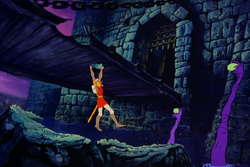
Dragon's Lair

1983 · Don Bluth⛔ Streaming disabled

The most iconic LaserDisc arcade game ever made — directed by Don Bluth, the same animator behind The Secret of NIMH and The Land Before Time. Dragon's Lair cost $0.50 to play in 1983 when every other arcade game cost a quarter. The cabinet streamed full hand-drawn animation from a Sony LaserDisc player in real time. You can play it on your Mac through Velocity.

Emulator

Hypseus Singe

Quality

Excellent

Also included

Space Ace, Cliff Hanger

Streaming note: Velocity automatically disables streaming capture for Dragon's Lair. The rights holder actively enforces streaming rights. You can play locally — Velocity simply won't send the session to Twitch or Kick. We're exploring a streaming partnership with the rights holder that would allow licensed streaming through Velocity in a future update.

Dragon's Lair — Velocity
GPTK 4Metal 4
Dragon's Lair (1983)
© 1983 Don Bluth / Digital Leisure. Shown for product demonstration.
⚡ Velocity HUD
FPS60
FT16.6ms
Hypseus
LaserDisc
Visual representation of Dragon's Lair (1983) by Don Bluth

Nintendo

GameCube

Excellent

2001–2007 · Dolphin

8× native resolution on M2+

Wii

Excellent

2006–2013 · Dolphin

Full Wiimote + Nunchuk support

Nintendo 64

Very Good

1996–2002 · RetroArch

ParaLLEl-N64 core

SNES

Perfect

1990–2003 · RetroArch

Snes9x core

NES

Perfect

1983–2003 · RetroArch

Nestopia UE core

Game Boy Advance

Perfect

2001–2010 · mGBA

Cycle-accurate

Game Boy Color

Perfect

1998–2003 · mGBA

Game Boy

Perfect

1989–2003 · mGBA

Original DMG through Pocket

PlayStation

PlayStation 2

Very Good

2000–2013 · PCSX2

Full speed on M2 Pro+, most titles M1+

PlayStation

Excellent

1994–2006 · DuckStation

Up to 8× upscaling, near-instant loads

Sega

Dreamcast

Good

1998–2001 · RetroArch

Flycast core

Sega Saturn

Good

1994–1998 · RetroArch

M2 Pro+ recommended

Sega Genesis

Perfect

1988–1997 · RetroArch

Genesis Plus GX core

Arcade

Arcade (MAME)

Excellent

1970s–2000s · MAME

~40,000 titles — Pac-Man, Gauntlet, Donkey Kong, Street Fighter, and more

Arcade (FBNeo)

Excellent

1980s–2000s · RetroArch

CPS1/2/3, NeoGeo — best-supported common titles

Atari

Atari Jaguar

Good

1993–1996 · MAME

Last Atari console

Atari Lynx

Perfect

1989–1994 · MAME

First color handheld

Atari 7800

Perfect

1986–1992 · RetroArch

Backward compatible with 2600

Atari 5200

Very Good

1982–1984 · MAME

Pac-Man, Missile Command

Atari 2600

Perfect

1977–1992 · RetroArch

River Raid, Pitfall, Combat — Stella core

Atari ST

Good

1985–1993 · RetroArch

Hatari core — huge 16-bit library

PC

MS-DOS

Excellent

1981–1995 · DOSBox-X

Doom, Quake, Warcraft, Diablo 1 — the whole pre-Windows catalog

Running in Velocity

The "Velocity HUD" overlay is Velocity's — it does not appear over the game during play unless you enable it.
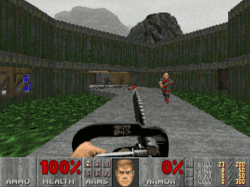
Doom (1993) — Velocity
GPTK 4Metal 4
Doom (1993)
© id Software. Bundled free with Velocity.
⚡ Velocity HUD
FPS200
FT5ms
DOSBox-X
© 1993 id Software. Bundled free with Velocity.

Bundled free with Velocity

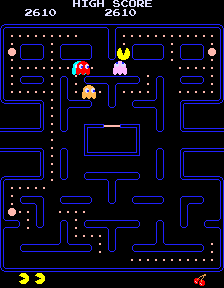
Pac-Man (1980) — Velocity
GPTK 4Metal 4
Pac-Man (1980)
© Namco. Shown for product demonstration.
⚡ Velocity HUD
FPS60
FT16.6ms
MAME
© 1980 Namco. Visual representation.

40,000+ MAME titles — Free

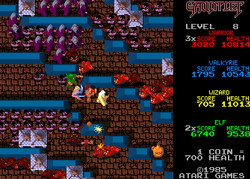
Gauntlet (1985) — Velocity
GPTK 4Metal 4
Gauntlet (1985)
© Atari Games. Shown for product demonstration.
⚡ Velocity HUD
FPS60
FT16.6ms
MAME
4 Player
© 1985 Atari Games. Visual representation.

"Elf needs food badly" — MAME

Getting started

1

Install emulators

Download Dolphin, DuckStation, PCSX2, mGBA, RetroArch, or DOSBox-X — whichever systems you want. Velocity tells you which ones you're missing.

2

Add ROM folders

Point Velocity to the folders that contain your ROMs. It scans automatically and adds every supported file to your library.

3

Play

Click any game. Velocity picks the right emulator, configures it, activates Game Mode and the HUD, and launches. Just like a Windows game.

Copyright notice

Velocity does not include, distribute, or link to ROM files. It plays files from your own collection. Most game ROMs remain under copyright — use only ROMs for games you own, or ROMs officially released as freeware. MAME's official freeware ROM list →

Requires macOS Tahoe 26 or later · Apple Silicon only